The AI-powered platform for your Google Business Profile
A to Z Local Rank tracks your rankings on the map, watches your competitors, helps you publish posts and answer reviews, and reports your progress — in one place, for one business or for a whole agency.
Every new account gets 100 free scan points. No card needed to register.
Rankings, reviews, posts, listing protection and reports — one platform.
How it works
Three steps between you and a looked-after profile.
1
Connect your Google profile
Sign in and link the Google Business Profile you manage. Your Google account stays yours — we connect with manager access, never with your password.
2
Authorized accounts only
Connect your Google Business Profile with an authorized Owner or Manager account. We verify eligible self-serve connections; agency-managed profiles follow the business-owner authorization process. Management features unlock only after the required permissions are confirmed.
3
Track, post, reply, report
From one dashboard: watch your map rankings, publish posts, answer reviews, and receive visual reports that show your progress over time.
Every part of the tool, explained
One platform for the whole job of looking after a Google Business Profile — here is what each part does.
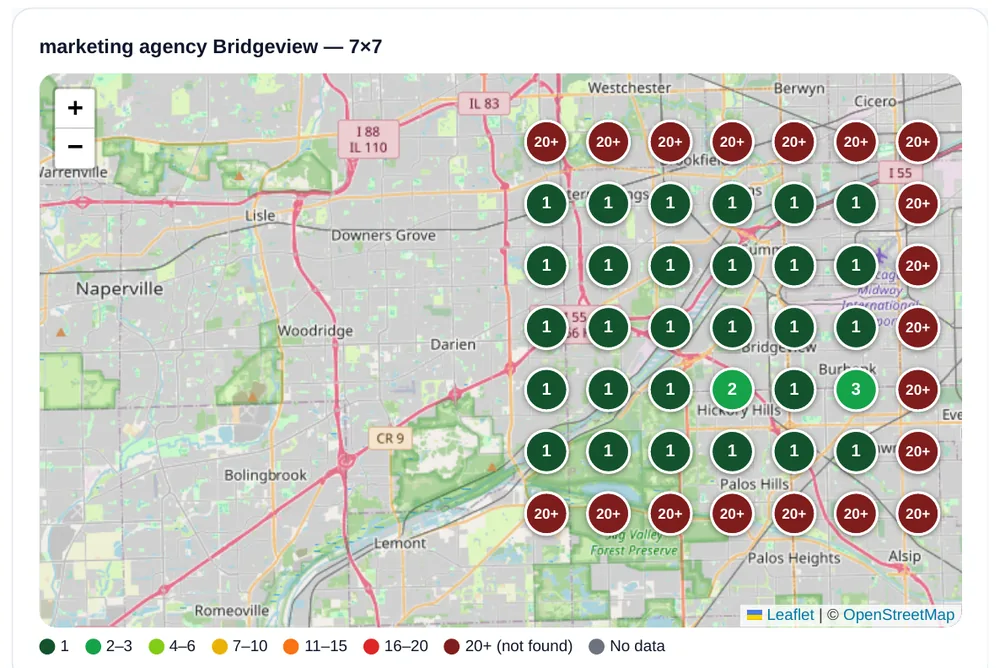
We check Google Maps results on a grid of points around your business, for every keyword you track, and paint each point on a heat map. You see your grid visibility %, your top-3 % and your average position — in plain terms.
See exactly where you rank, street by street — not one vague number.
atozlocalrank.com
Keyword generation
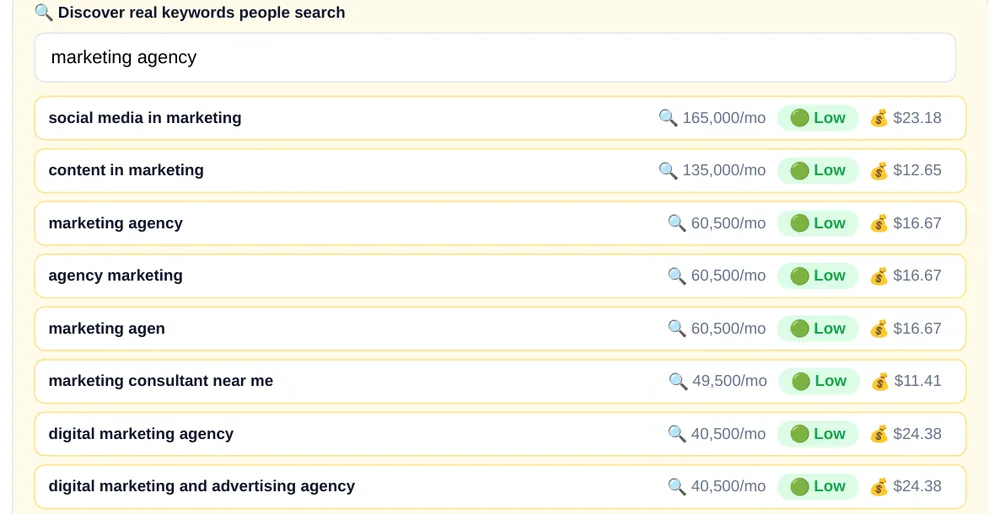
Start with a keyword and discover up to 30 related ideas using Google Ads keyword data provided by DataForSEO. Explore estimated monthly search volume and paid-advertising competition, then choose which keywords to track in GeoGrid. Nothing is added to your tracked keywords automatically.
Start from the words customers actually type — not guesswork.
atozlocalrank.com
Competitor reports
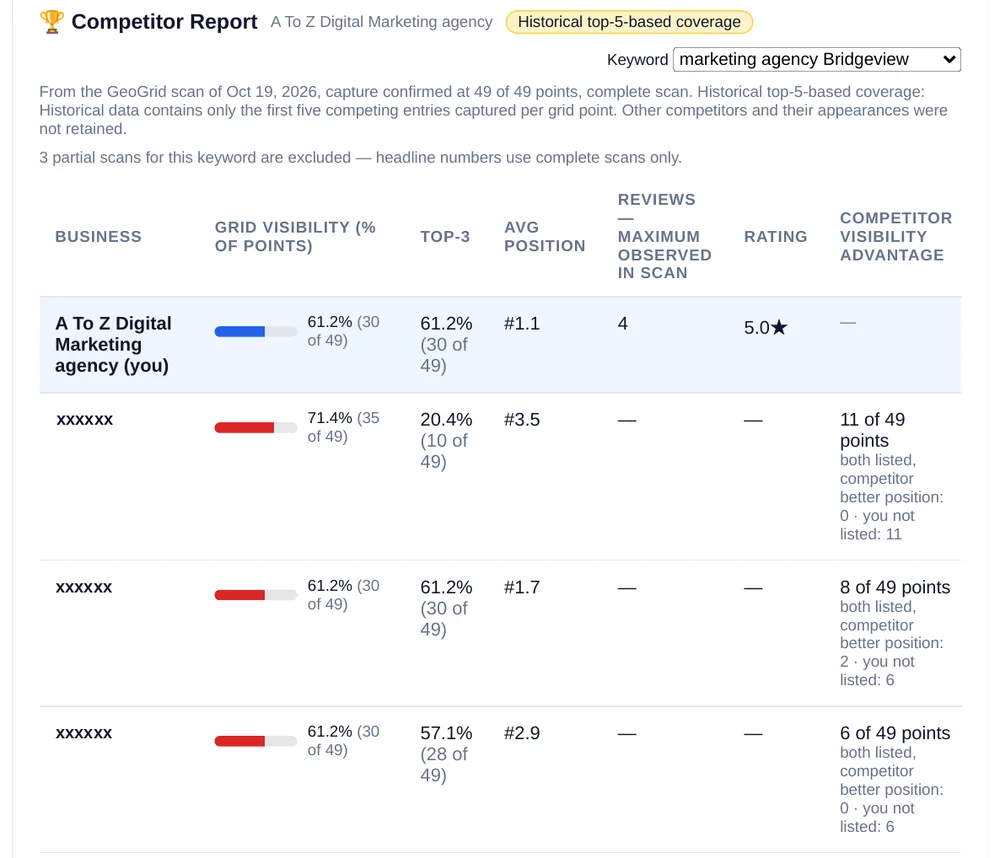
Every scan also records the other businesses on your grid. The competitor report ranks them by visibility and shows you head-to-head where each rival is strong — with your business pinned at the top.
Know who is really ahead of you on the map, and by how much.
atozlocalrank.com
Google posts, offers & events
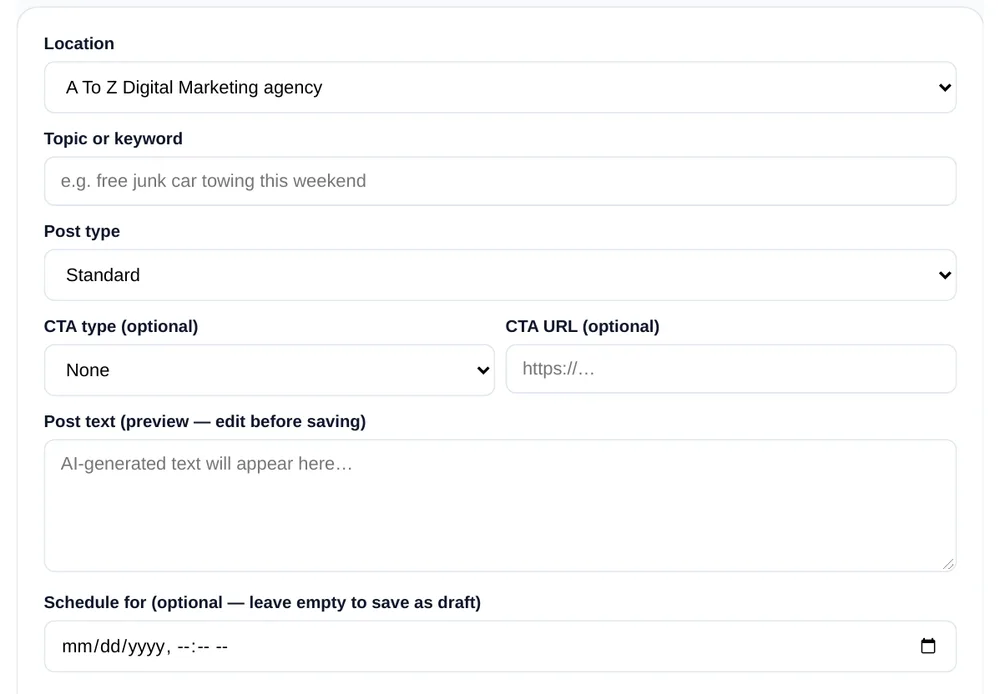
Create updates, offers and events for your profile in one composer, with photos from your library. Every post is checked before it goes out — the text never carries phone numbers or links.
A profile that always looks alive, without logging into Google each time.
atozlocalrank.com
Reviews inbox, replies & review links
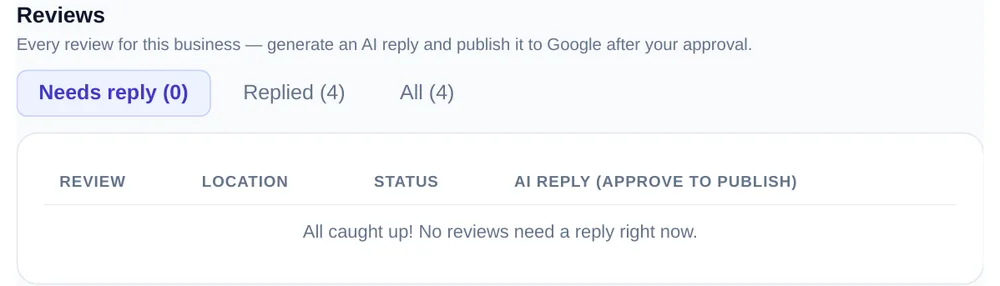
New reviews from every location land in one inbox. Draft a reply — with AI help if you like — read it, and publish it. Your own review link and QR code let you ask every customer for a review the same fair way.
No review goes unanswered, and asking for new ones takes one link.
atozlocalrank.com
Guardian listing-change alerts
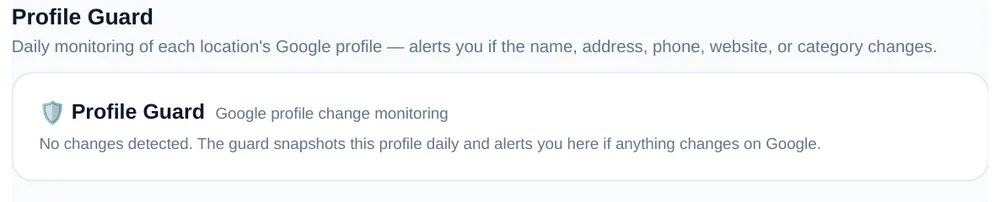
Guardian watches your profiles on Google and flags unexpected changes — name, hours, phone and more — so a wrong or unwanted edit never sits unnoticed on your listing.
Hear about a listing change from us, not from a lost customer.
atozlocalrank.com
Profile health score & improvement plan
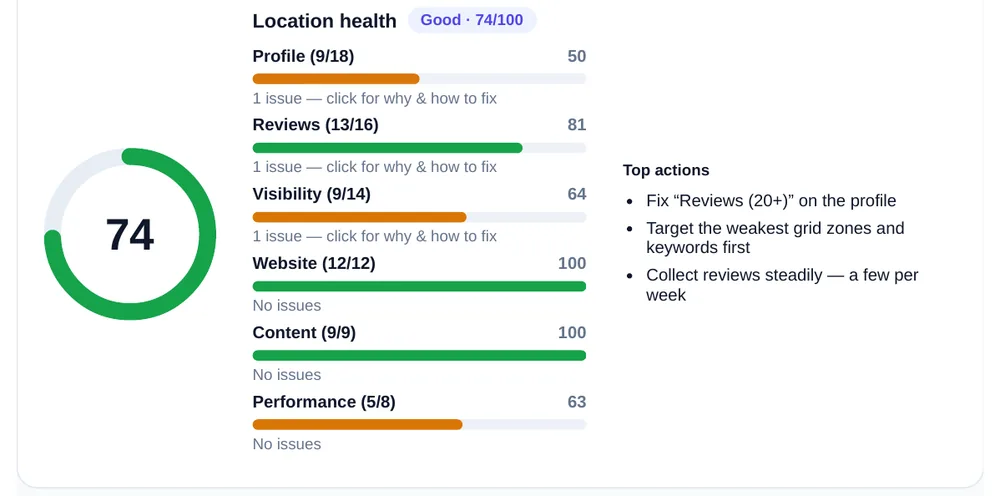
Every profile carries a health score from 0 to 100, built from what your profile has and what it is missing. The improvement plan lists the fixes, and items complete themselves as the work gets done.
You always know what is missing — and what to fix next.
atozlocalrank.com
Website SEO audit
On-page local-SEO checks for each location's website — titles, local details and the basics a customer, and Google, meet first. The audit score feeds the Website component of the profile health score.
A weak page shows up as a fix to make — not a mystery.
atozlocalrank.com
Citation Audits & Guided Listing Tasks
We audit the directories that list your business and track where your name, address and phone are consistent — and where a listing is missing. Where a listing needs creating or fixing, you get a guided task for that site: the actual submission is a manual step, completed site by site — never an automatic listing creation — and only with the owner's authorization for that site.
Consistent listings everywhere customers — and Google — look.
atozlocalrank.com
Visual performance reports
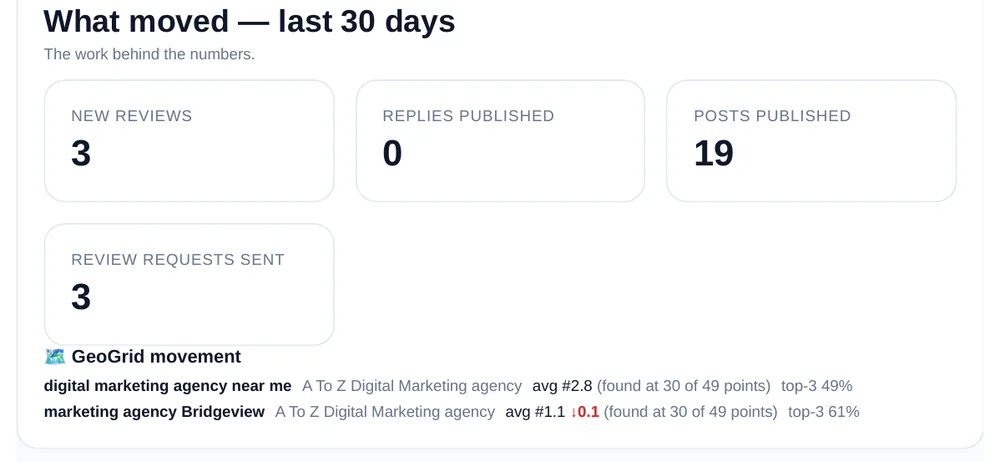
Reports show rankings, reviews, calls and progress as pictures, not raw tables. Agency plans display their agency's name on client performance reports. Solo reports display the A to Z Local Rank brand.
Reports a client actually reads — and understands in a minute.
atozlocalrank.com
AI search visibility checks
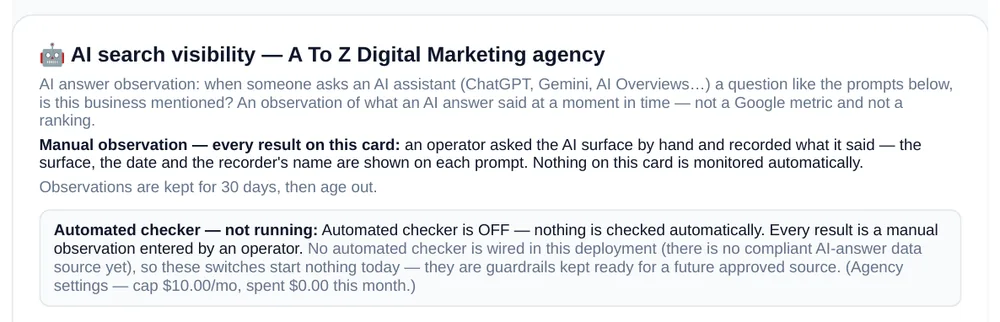
We record how selected AI assistants answer questions about your business, and keep the results over time. Each check is a dated snapshot — what the assistant said, and when it said it.
See what AI says about your business, out in the open.
Actual dashboard screenshots from A To Z Digital Marketing’s own workspace, captured October 2026. Metrics reflect this business’s recorded activity and search conditions, not predicted customer results. Competitor names covered for privacy.
Powered by AI. Approved by humans.
AI helps with visibility checks, recommendations, and content drafts — review replies and post text drafted from your verified business facts only. It is not allowed to invent services, prices, or claims.
Every AI draft is a draft: a person reads it before anything is used. Publishing requires the business owner’s authorization.
Drafts are produced on our own system from your verified facts — your business data is not sent to an external AI service. We never sell your data, and we never use it to train public AI models. How AI features handle data is spelled out in our Privacy Policy.
Being found in AI answers
More people now ask an AI assistant — not a search box — for a local recommendation. The assistant builds its answer from public listings and pages it can read. There is no form inside an AI assistant where a business can sign up: what you control is how complete and consistent those public sources are.
Illustrative public information sources — one business, three public listings AI assistants may read before they answer.
Google Business Profile
Your Google listing — name, categories, services, hours, photos and reviews. It is the profile this platform looks after day to day, and one of the main public sources AI answers draw on.
The listing you already manage here.
Bing Places
Bing Places helps businesses manage their information in Bing Search and Bing Maps. Bing search information may contribute to Microsoft-powered AI answers, but it does not ensure inclusion in ChatGPT — yet many owners have never claimed theirs.
The most-missed listing of the three.
Apple Business
Apple Business (formerly Apple Business Connect) is where your place card on Apple Maps lives — what iPhone users see when they search nearby, and another public source assistants read before they answer.
Your business, correct on Apple Maps too.
We keep an eye on it the open way: a person asks an AI assistant a question a real customer would ask, records what it answered, and the entry is saved as a dated manual observation — a snapshot of one answer on one day, not a ranking and not a score. No tool can promise an assistant will name your business. What we can do is keep the sources it reads complete, consistent and current — and show you what it said.
Who it’s for
Solo
You own the business
Manage your own profile: rankings, posts, reviews and reports for your location, with AI help on the drafting. Your reports carry the A to Z Local Rank brand.
Agencies
You manage clients
Many locations and many clients in one workspace, the owner’s authorization collected for every profile, and agency-branded reports that carry your agency’s name to your clients.
Choose the plan that fits your business
Flat, inclusive plans — monthly or annual billing, and you can cancel renewal in one click.
Four plans: Solo for one location, and three Agency sizes for teams managing client profiles. You can pay monthly or annually — annual billing is discounted, and the discount grows with the plan size. Every price is on the pricing page.
Can I cancel easily?
Cancel subscription renewal in one click. Access normally continues through the paid period, subject to the Terms.
Why do you require the business owner's authorization?
Because a Google Business Profile belongs to its owner. An agency managing a client's profile needs the owner's own confirmation before anything is managed under it — that protects the owner, the agency, and the listing itself. No confirmation, no management.
What are the 100 free scan points?
Every new account receives 100 scan points. One point scans one map point for one keyword, so 100 points cover two full 7×7 ranking grids. Use them on manual scans while you explore — a plan unlocks your full keyword and location allowances.
Is my Google account safe?
We connect with manager access that you grant — we never see, ask for, or store your Google password. Your profile and your data stay yours, and you can remove our access yourself, at any time, in your own Google account.
Will this put my business first on Google?
No tool can honestly promise a ranking — placement on Google Search and Maps is Google's decision, and it changes constantly. What we promise is the work itself, done consistently and within your authorization, and reports that show measured movement after changes, with sources.
Start with 100 free scan points
Register, connect your profile, and see your first ranking grid — on us.